The private knowledge base of everything you say, hear, and transcribe.
Meetings, dictation, files — all on-device. MCP-native. $39 once.
Download the app, open it, and start recording. No accounts, no API keys, no configuration.
Download the DMG and drag Mindflow to Applications. The speech model downloads automatically on first launch.
Click record in the menu bar or let it auto-detect meetings. Audio stays 100% on your machine.
Transcripts stream to your AI assistant via MCP. Ask about your meeting while it is still happening.
Mindflow's MCP server runs on localhost. Your AI assistant can start recordings, poll live transcripts, and search your entire knowledge base — all while the meeting is still happening.
{
"mcpServers": {
"mindflow": {
"command": "node",
"args": ["/Applications/Mindflow.app/Contents/Resources/mcp-server/dist/index.js"]
}
}
}
> /mindflow start Recording started. Transcription streaming to session.jsonl. > What did Sarah say about the API deadline? Based on the live transcript (12:34–12:47): Sarah proposed pushing the API v2 deadline to March 15th, contingent on the auth migration completing by end of February.
Works with Claude Code · Cursor · Windsurf · any MCP client
Capture meetings. Dictate anywhere. Drop in files. Everything goes to one place — on your Mac.
Capture system audio + mic. Live to AI. Never leaves your Mac.
Global hotkey ⌃⌥⌘Space. ~1.5s latency. Auto-paste anywhere.
Drag, drop, paste a YouTube URL. Watched folders. Local.
Everything you've ever said, heard, or transcribed — searchable by you and your AI.
Folders by client, project, anything.
Available now
Tag any meeting.
Available now
Across everything. From any AI assistant via MCP.
Available now
Meetings are named automatically from the first spoken sentence. Rename anytime via MCP or Settings.
Available now
Consecutive segments from the same speaker are merged in exports for cleaner, more readable transcripts.
Available now
Set your display name in Settings so your voice is attributed correctly in every transcript.
Available now
Add custom words and replacements so whisper learns your vocabulary: names, acronyms, jargon.
Available now
Built-in diagnostics: send a report from the menu bar, Settings, or after a crash — one click, no sign-in needed.
Available now
Download, drag, done. Mindflow handles the rest.
Click the Download button in the top nav to grab the latest DMG for your Mac.
Open the DMG and drag Mindflow into your Applications folder. Standard macOS install.
Open Mindflow from Applications and grant Screen Recording when asked. The speech model downloads once, then everything runs on your Mac.
100% local. Everything runs on your Mac — no cloud, no account, no telemetry. The speech recognition model downloads once on first launch and stays on your machine forever.
First launch: macOS may ask you to confirm the app is safe to open (standard for apps distributed outside the App Store). Right-click Mindflow in Applications → Open, then click Open in the dialog. One time only.
Mindflow is free during private beta. After beta, $39 one-time. Lifetime updates included. No subscription. No caps.
Currently in private beta
Free during beta
On-device capture and transcription. No cloud, no account, no telemetry.
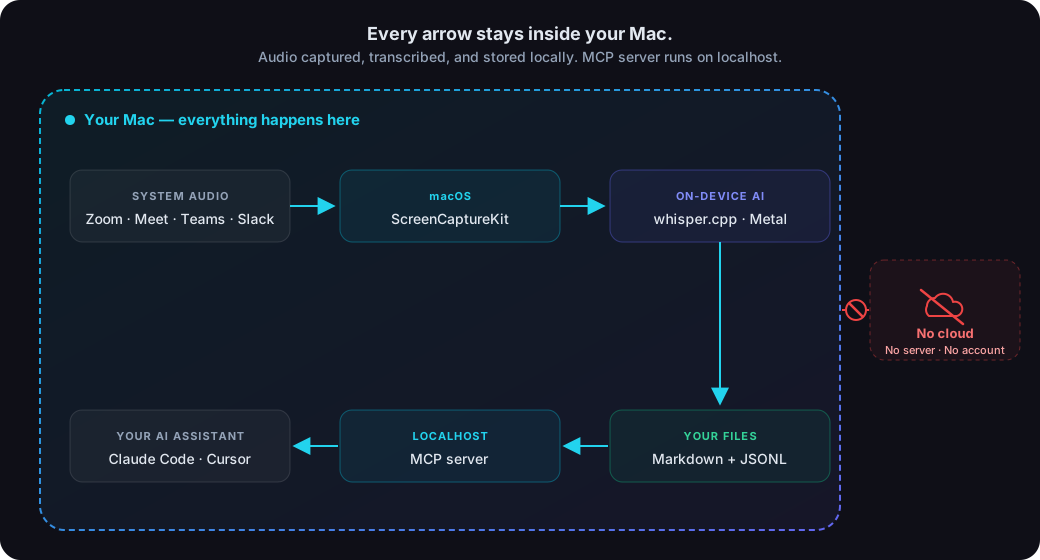
Audio is captured and transcribed entirely on your Mac.
Nothing to sign up for, nothing to log in to.
We can’t see what you transcribe. Nobody can.
Captures system audio directly. Other participants never see a bot.
Other tools cover one slice of voice. Mindflow is the whole knowledge base — on-device, MCP-native, one price.
| Mindflow | Fathom | MacWhisper | Wispr Flow | |
|---|---|---|---|---|
| On-device | ✅ | ❌ | ✅ | ❌ |
| Live meetings | ✅ | ✅ | ❌ | ❌ |
| Dictation | ✅ | ❌ | ❌ | ✅ |
| File / URL batch | ✅ | ❌ | ✅ | ❌ |
| MCP-native | ✅ | ⚠️ added | ❌ | ❌ |
| One-time price | $39 | Free with caps | $29 (files only) | $15/mo |
Any meeting platform: Zoom, Google Meet, Microsoft Teams, Slack Huddles, FaceTime, Discord. Captures system audio, so it works with any app that produces sound.
Yes, but Apple Silicon (M1/M2/M3/M4) is strongly recommended for real-time transcription performance. Whisper uses Metal GPU acceleration on Apple Silicon.
All 99 languages supported by whisper.cpp. Best accuracy with English. Set your language in Settings or per-session via MCP.
Depends on the model you choose. Base (~150 MB) for speed, Large-v3 (~3 GB) for accuracy. Downloaded once on first launch.
No. Mindflow captures audio only. No screen recording, no camera.
The transcript saves as a Markdown file and a JSONL file to ~/.local/share/mindflow/transcripts/. You own the files.
Any MCP-compatible assistant: Claude Code, Cursor, Windsurf, and any tool that supports the Model Context Protocol.
The speech recognition engine (whisper.cpp) is open source. The Mindflow app itself is proprietary, currently free during beta.
$39 one-time after beta. Lifetime updates included. The features you get during beta are the features you keep.
Mindflow is distributed outside the Mac App Store. Right-click the app and choose Open on first launch. This is standard for independent Mac software.
Install Mindflow in under a minute. No sign-up required.